This week was all about figuring out how we’re going to be moving forward! There’s a whole lot to decide, but we’re beginning to get our first handle on our project timeline.
First things first, let’s take a look at the Space Bridge on the 5th floor of the Entertainment Technology Center (the focus of our project):
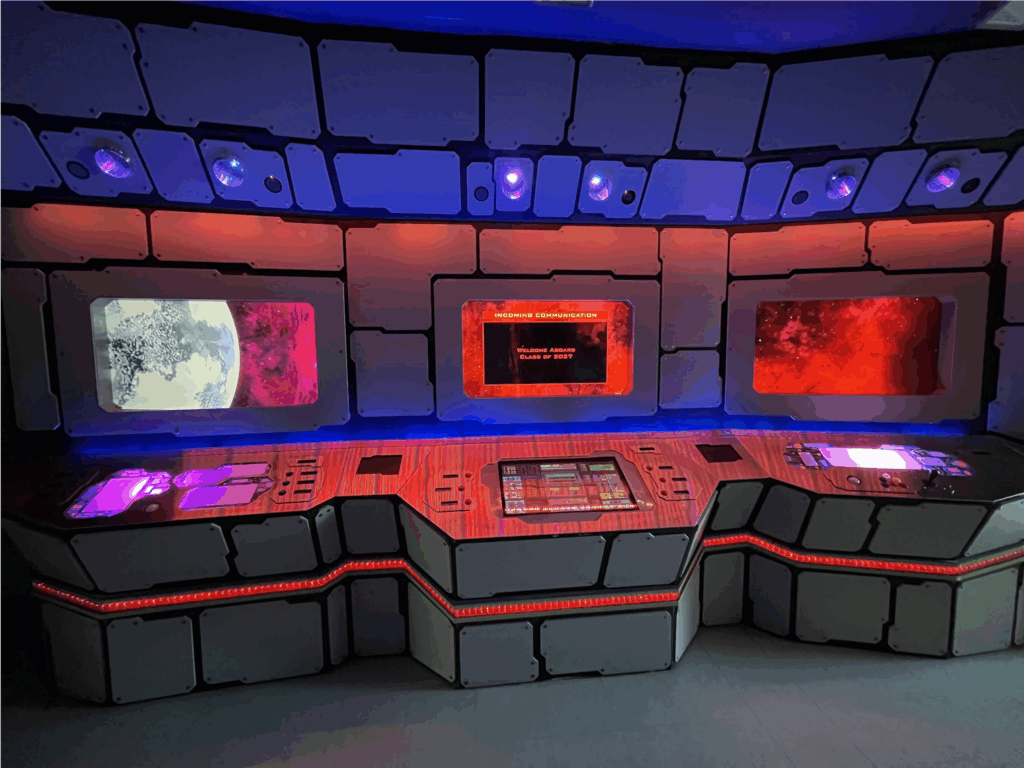
This iconic ETC platform was installed in 2006-07 as a student pitch project. It has gone through many cycles of renovation and development since and now it lands in our hands (to a certain degree). As a team, our focus is looking at developing LBE experiences using the Space Bridge in the modern year. The Space Bridge provides a unique opportunity here at the ETC to allow for LBE experimentation, especially due to the variety of contexts that it exists in. As a team, we’re hoping to look at making experiences that range from quick, daily interactions for the students and faculty who pass by the Space Bridge on their way to work or to classes all the way to full cooperative game experiences, treating the Space Bridge more like an arcade cabinet.
One of the challenges of this project is that achieving this goal requires us to manage two parallel timelines. Let’s talk about those timelines one at a time.
Hardware
While the actual nitty-gritty work of wiring and soldering isn’t the strict focus of our design-oriented project, in order to make the Space Bridge a functional platform for the team and our creative goals, we need to address some of the hardware needs of the Space Bridge. Currently, the ETC’s IT team is responsible for the maintenance and continued life of the Space Bridge (huge thanks to Steve, David, Bryan, and Jon for working with us). However, the current state of the Space Bridge does require a little bit of renovation as well in order to meet our needs.
The Space Bridge consists of 6 ‘stations’, each with their own upper display monitor. The entire bridge is divided into symmetrical halves, with 3 stations on each side. On each half, one station has 3 analog buttons and a trackball, one station has 6 analog buttons and a touchscreen display, and one station has a joystick and 6 analog buttons arranged in a triangle. As of right now, each station is driven by its own separate computer, and the upper screens are driven by their own computer as well. Unfortunately, in its current state, the upper display screens are disconnected from the computers that manage the input of the Space Bridge, and so its current (Spring 2025) function at the ETC is to display a space-themed animated wallpaper that runs on a loop (and can also display a popup to serve as a welcome message or banner on the center screen of each half).
Moving forward, our plan is broadly this: unify each half of the Space Bridge so that the inputs on the half are received by a single computer. Then use that computer to drive the three displays on the half, creating one singular system for each half of the Space Bridge. This will require us to work with our wonderful IT Department to construct a plan for the unification, as we can’t (and don’t want to) be responsible for ripping up all the wiring on this legacy platform ourselves. Also, as a safeguard, we hope to put in some simple switches to allow the Space Bridge to fall back to running the content of the current computer driving the monitors (just in case ☻).
We hope to get all of this done within the next 7 weeks (and much quicker, if possible). The main goal is that the Space Bridge becomes a functional platform for interactive experiences once again, so that we can focus on designing and deploying to it as soon as possible!
Software
Speaking of designing and deploying to the Space Bridge…
While we’re working on the hardware of the Space Bridge, there’s no use just sitting around waiting for parts to ship! As previously alluded to, one of the most interesting aspects of designing for the Space Bridge is that, in a sense, it lives many different lives: it is this massive, imposing thing that sits right in front of the elevators to the 5th floor; it has 3 asymmetric, arcade-style consoles to play with; it’s something that students and faculty alike pass by daily, pressing some of the buttons at random even though they don’t do anything; it’s the first thing that tour groups coming to the ETC notice when they first step out of the elevators (or, well, they notice it even before they step out). There’s a diverse range of contexts that the console can be used to experiment in, and that provides a very intriguing potential for its use as a platform. Our goal is to play with those contexts and see what it can do in these different spaces. Try and figure out what works and what doesn’t, and importantly what our team wants to make with the affordances that the Space Bridge provides.
Given that for the first chunk of our project timeline, we have limited access to the actual platform, our focus in concurrence with facilitating the changes to the hardware is to develop a software pipeline that allows us to emulate the Space Bridge, creating and testing on a ‘mirror’ of the platform even when we don’t have access to it. That way, we can make progress in the design area of the Space Bridge, in preparation for the moment that we get access to the Space Bridge proper.
To get into a few details, the majority of the Space Bridge’s analog inputs are driven by Phidgets. And so, in this first week, the main thing that our team has set up on the software side is a layer for Unity projects that serves as a kind of Space Bridge input manager, opening up the channels of the expected digital inputs, and wrapping their ‘onStateChange’ events in our own custom event that unifies the treatment of their game logic. By doing this, we are also able to insert keyboard analogues to each button input, which invoke that unifying event so that to any external game logic, the input of a keyboard or the input of the Phidget are exactly identical. Therefore, when designing in a debug environment, we have fairly decent assurances that our software will work acceptably once transitioned onto the actual platform (or our mirror of the platform).
Now, there are other input devices besides the Phidgets on the Space Bridge. Namely, there’s the touchscreen and the trackballs. These are mice, which are a tad difficult to distinguish. Coming into this project, on the technical none of us had much experience with this problem. I am writing this entry somewhat retrospectively, when we have now solved it, but I will lay out the issue now as we encountered at the time: Phidgets cannot be used with the modern Unity Input System. As of January 2025 at least, the Input System has an issue where it will grab all the available input devices that it can, regardless of whether or not one is using them with the Input System. The problem with this is that the Phidget21/22 APIs require you to open the channels and subscribe to Phidget’s own events, but the opening of these channels is blocked by the Input System. Therefore, we have to use the older Input Manager.
But the issue with the Input Manager is that it makes it difficult to differentiate two separate mice going into the same computer. I believe the Input System allows you to solve this with a Player separation feature that it has, but the Input Manager provides no such exposure of that knowledge. And so, if we were to unify all the inputs onto a single computer, differentiating the trackballs poses a challenge. We have since solved this, but I will not spoil how here.
So, at the end of the week this is where how our plan shaped up: we will be working concurrently with the IT team to make some changes to the Space Bridge in order to facilitate our use of the platform to prototype experiences, while we also prototype in our own emulated environments so that we are well prepared to deploy and test the moment we achieve our hardware goals.
See y’all next week!
Over and out,
The Intergalactic Buttoneers
