Week 3 Devlog
Our First Playable Prototype
Weekly Overview
After two weeks of setting up the display, researching precedents, and exploring possible directions, Week 3 was when 360 Studio finally moved from ideas into a playable experience. Our goal for the week was not to build a polished game. Instead, we wanted to create something quickly enough that we could answer a more useful question:
What does gameplay actually feel like when it happens across a continuous 360° screen?
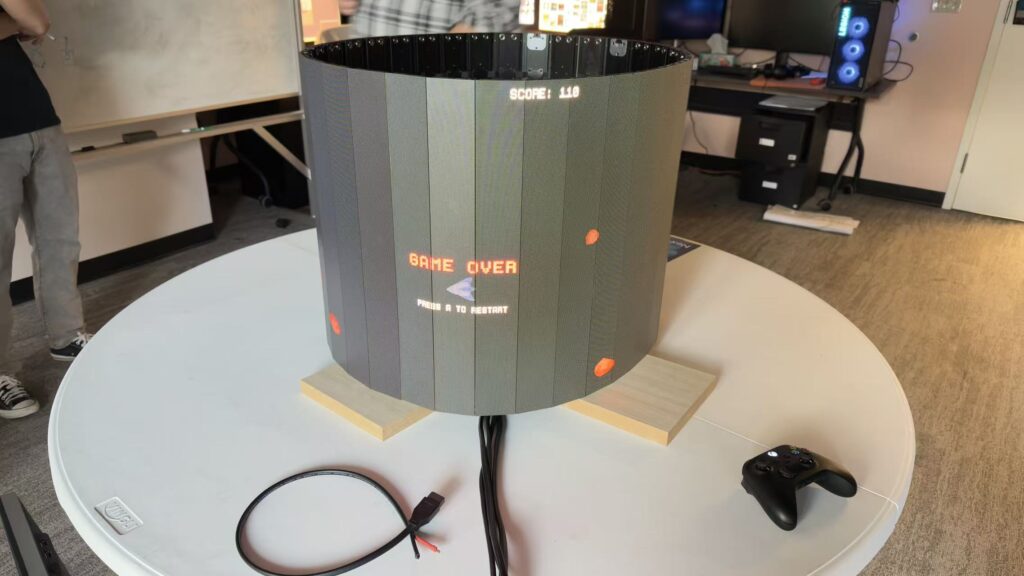
To explore that, we developed our prototype: a simple asteroid-based multiplayer experience designed specifically around the circular display.
Arcade Game Tryout
Rather than starting with a complex game system, we intentionally kept our prototype simple. The asteroid concept gave us a way to experiment with movement, visibility, spatial awareness, and player attention across the curved screen. Objects could occupy different parts of the continuous display, forcing us to think about gameplay differently from a traditional flat-screen experience.
For the first time, we were designing around questions such as:
- What happens when an important object moves outside a player’s immediate field of view?
- How easily can players understand where something is on a circular screen?
- Should gameplay encourage players to turn their bodies and look around?
- How should objects move across the physical seams and curvature of the display?
- How much information can be distributed around the screen before the experience becomes difficult to follow?
These were questions we could speculate about during brainstorming, but the prototype allowed us to finally test them in practice.
Designing for a Continuous Space
One of the most important changes in our thinking this week was realizing that designing for 360° is not simply a matter of creating a wider camera.
On a traditional screen, the player can usually see the entire relevant play space at once. On our display, that assumption no longer holds. Something can exist on the same screen while still being physically behind the player. That creates an unusual design opportunity: attention itself can become part of the interaction. A player may need to look around, track movement, communicate with another player, or respond to something they cannot currently see. At the same time, this creates a design challenge. If players miss important information because they simply cannot see it, the experience can quickly become confusing rather than engaging. Our first prototype gave us a concrete environment for beginning to explore that balance.
Playtesting the Prototype
Once we had a functional version of the prototype, we began playtesting.
This was an important milestone for the project. Until this point, most of our understanding of the display came from technical tests, media playback, research, and our own assumptions. Now we could observe what happened when someone actually tried to play. Rather than treating the playtest as a test of whether the asteroid game itself was “fun enough,” we used it primarily as a way to evaluate the interaction between players and the display.
We paid attention to things such as:
- Where players naturally chose to stand.
- How often they turned or moved while playing.
- Which parts of the display attracted their attention.
- Whether events happening elsewhere on the screen were noticed.
- How easily players understood what they were supposed to do.
- Whether the 360° format contributed meaningfully to the experience.
This distinction became important for us. At this stage, the prototype is a research tool as much as it is a game. Its purpose is to help us discover which assumptions about the 360° environment are correct — and which ones need to change.
Quarters Feedback
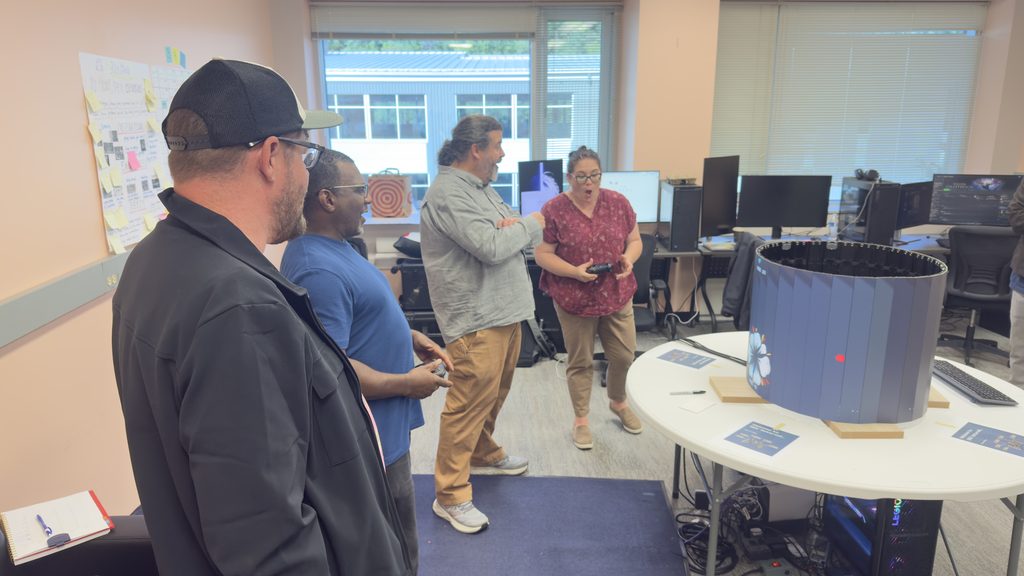
We used our 360 Asteroid game to demonstrate what we had learned and ask faculty where the cylinder can take us. The feedback reinforced an important lesson: We should explore various aspects of the cylinder and create experiences that depend on its uniqueness.
Feedback on 360 Asteroid
We treated our Asteroid game as a technical benchmark rather than developing it as a polished game. We got feedback from this experiment. Faculty noticed that players sometimes lost track of their ships after they moved to the opposite side. Clear visual, directional, or audio cues could help players understand where they are and what is happening outside their view. The controls could also be simplified by placing acceleration and braking on opposite triggers. Other suggestions included keeping scores and essential information visible, balancing speed with readability, clearly defining whether players are cooperating or competing, and making better use of the screen’s vertical space. At the same time, the physical behavior around the display was promising. Players enjoyed running, colliding, and blocking one another, suggesting that movement itself could become part of the game.
| Category | Key Feedback | Ideas to Test | Game References |
|---|---|---|---|
| Social Play | Make interaction between players the main focus | Simple controls, teamwork, competition, shared information | Overcooked, Killer Queen, Jam O Drum |
| Movement | Make moving around the cylinder part of gameplay | Following characters, changing direction, territory capture, physical blocking | Paper.io, Splatoon |
| Player Clarity | Help players understand action they cannot fully see | Character indicators, respawn cues, visible scores, audio cues, readable speed | Defender, Resogun |
| Space & Perception | Explore the cylinder’s shape, height, and central opening | Vertical gameplay, depth illusions, portals, unusual gravity, physical objects | Super Mario Galaxy, Miegakure, 4D Golf, Antichamber, Gorogoa, Rusty Lake, Magic Planet |
At Quarters, one question stuck with us. Did our asteroid game really need the cylinder? Faculty pointed out that players on opposite sides could see different things. We started thinking about how to use that to give people a reason to move around the Ring and talk to each other. Killer Queen came up as a reference for getting a larger group playing together.
“Killer Queen on here with 10 people going around would be incredible.”
We also got some practical feedback on the controls. One player told us they never used the brake because they hadn’t realized it was on the same side as the accelerator. That gave us a concrete change to try, and faculty also encouraged us to test inputs beyond the gamepad. For depth, one suggestion was as simple as trying a dark lens over one eye.
“Put one sunglass over one eye… it doesn’t take much.”
Faculty pushed us to try more small ideas, including some we could test before writing any code. We also came away with a question to discuss with our advisors about where we wanted people to play. A demo in our project room and a setup for a festival would ask different things of the build.
Ideas for the cylinder
One of the strongest directions from the discussion was social multiplayer. Because players stand around the cylinder, they can see one another while viewing different parts of the game. This naturally supports asymmetric information, where one player knows a portion of visual information that another player cannot see. Future prototypes could explore territory control, distributed task stations, opposite-side teamwork, or a central boss attacked from different directions. Other ideas included wraparound projectiles, trick shots, friendly fire, tunnels, and wormholes. Sound could confirm events happening outside a player’s view, turning the hidden side into an intentional mechanic rather than only a visibility problem. Faculty also encouraged us to explore the entire physical setup. The cylinder’s central opening could hold physical objects or controls, while cameras, tracking, motion input, phones, and directional speakers could create new interactions. Visually, we could experiment with parallax, depth illusions, reverse perspective, and non-Euclidean space. Another concept connected physical movement with time: walking clockwise could move time forward, while walking counterclockwise could move it backward. The environment could then change while hidden from view, encouraging players to circle the display and discover what happened.
References
Faculty recommended several games and projects to guide our research. Paper.io and Splatoon offer references for territory control, while Overcooked demonstrates how distributed tasks can encourage movement and communication. Killer Queen shows how simple rules can support large teams and multiple objectives. For spatial experimentation, faculty mentioned Miegakure, 4D Golf, and Antichamber. Defender and Resogun provide examples of wraparound movement and off-screen threats, while Super Mario Galaxy demonstrates curved worlds and vertical depth. Gorogoa and Rusty Lake may also inspire environmental transformation and time-based discovery. Before Halves, we will continue creating small, focused prototypes rather than committing to one final game too early. Each prototype will investigate one research question and document what worked, what did not, and what the cylinder allowed us to discover.
What We Learned
Week 3 changed the way we approached the project. During the first two weeks, much of our discussion revolved around what the display could potentially enable. Now we have started asking a more grounded question:
What does the display actually cause players to do?
Our first prototype reinforced several ideas that we want to continue investigating:
Spatial awareness matters.
The display can create situations where players need to pay attention to more than one direction.
Visibility needs to be designed intentionally.
Putting gameplay everywhere around the player does not automatically make the experience more immersive.
Physical behavior is part of the interface.
Where players stand, where they look, and whether they turn or move can become part of the experience.
Simple prototypes are valuable.
A small playable experiment can answer design questions much faster than a long discussion or highly polished concept.
Most importantly, this week gave us our first real feedback loop:
Build → Play → Observe → Learn → Iterate.
That loop will guide the next stage of 360 Studio.
Next Week — Exploring a Social Multiplayer Game
For our second prototype, we want to explore how the cylindrical display can support a social multiplayer experience. Unlike a traditional screen, the cylinder naturally places players around a shared space, allowing them to see, communicate with, and react to one another while playing.
To investigate this, we will create a six-player (or even more) platform fighting game inspired by Super Smash Bros. and Doodle Jump. Players will move and jump across platforms around the cylinder, using basic melee attacks to knock opponents away. Falling from the platforms eliminates a player, and the last player wins.
The simple and competitive mechanics are designed to encourage conversation, rivalry, shared attention, and spontaneous reactions among players. Each controller will correspond to a distinct character color and starting position, helping players quickly locate themselves and understand who they are competing against.
Through this prototype, we want to explore:
- How to develop from our prototype 1 and create a more immersive multi-player focused experience (Player >= 2)
- How the cylinder supports social interaction among multiple players
- Whether players communicate and react to one another during play
- How players divide their attention between the game and the people around them
- How easily players can locate and track their characters
- How wraparound movement affects visibility, positioning, and combat
Our goal is to understand how the display can create a more physical, social, and shared style of play.