This week was short because we had Thanksgiving break from Wednesday through the weekend. The team continued working on our list of tasks and fixes that needed to be made before ETC festival and the end of the semester next week.
One point of confusion through all our playtests was the control system. We found that people understood how to use the app after having the controls explained, but when this app gets used by our clients, we will not be there to explain the system to everyone. Therefore, we started working on UI menus for both building and riding mode that would clearly explain all of the input mappings.
For ride mode, we have three different controller mappings (keyboard, Xbox controller, and custom controller), so we made multiple menus.
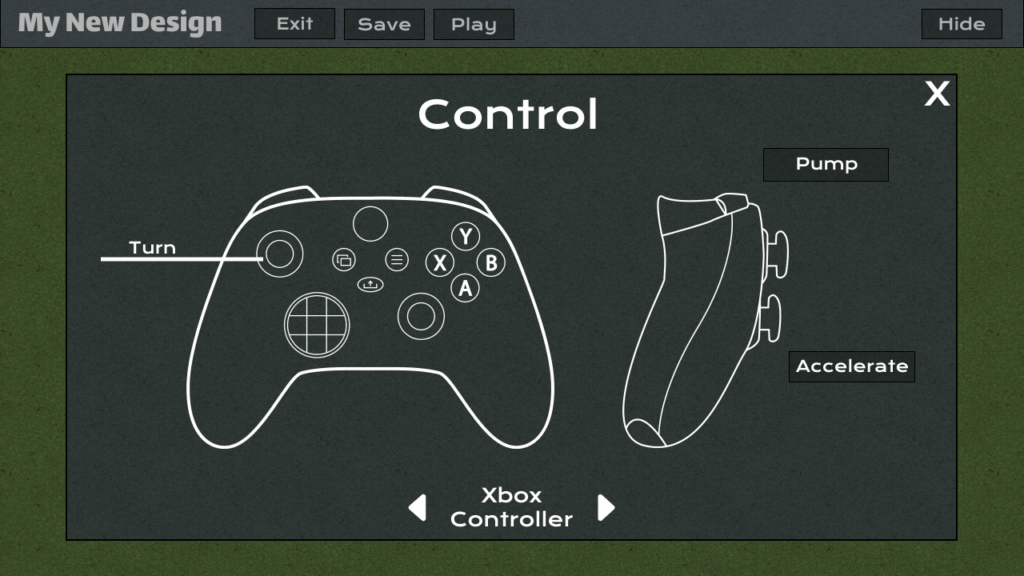
We also have been experimenting with how to best represent pumping on the Xbox controller (joystick vs. buttons), and we settled this week on using the buttons on the back of the controller to pump. Now, the bumper buttons pump up while the trigger buttons pump down, and holding down both simultaneously gets the maximum effect.
Another feature that got completed this week was the connection tool that generates custom line meshes between two points that are sufficiently close enough and in the same direction for a smooth path to exist between them. In order for the track saving and loading functions to work correctly, we needed to save data about these connector pieces, so that they could be regenerated when a user loads in a track. This has now been done, so our clients can easily transfer tracks between devices.
The other major feature we focused on this week was providing better visual feedback and prompting for when users should pump. There are visual effects when the user correctly pumps up or down in accordance with the slope of the track beneath them, but our clients want to be able to use our tool to also reinforce the fundamentals of the timing of pumping. We created a draft UI bar to go on the left side of the screen that would indicate the current slope of the track, along with an indication for what button the user should be pressing.

We will need to continue refining this UI next week, as it draws users’ attention away from the riding and is not the most clear for what we want to communicate. Next week, we will also be implementing the final features and touch-ups that will go into the product.