
Install Plugin
Open Unreal Engine.
Click on Edit, Plugins. In the pop-up window, add 3D Gaussians, and reopen Unreal for this change to take effect.


Optional step to see the Niagara folder: Open the Content Drawer on the left side. Click on Settings (gear icon), and make sure Engine Content and Plugin Content are checked.

Import a 3DGS ply file. If a compatibility issue pops up, use SuperSplat to export a Standard PLY. For more information on SuperSplat, check out our SuperSplat documentation.

Once we import the .ply file, we can drag it directly into our game scene and get a 3DGS game object.

Get the Special Niagara System
In your Content Drawer, right-click and select Niagara System from plugin’s folder. This is a specialized Niagara System Template that contains specific parameters from the plugin. We need to edit it as a foundation to create our desired effects.

Double-click on it, and a new window will pop up. Here, we can impelement our own effects.

Time Control
- Click on Emitter State. Change the Loop Duration to a big number (e.g. 10000)
- Click on Initialize Particle. Change the LifeTime Max to a big number (e.g. 10000)


- Use SystemUpdate.LoopDuration as the actual particle system life time. For exapmle, if we set the time in SystemUpdate.LoopDuration as 8, the effect will last for 8 seconds

Add Effect
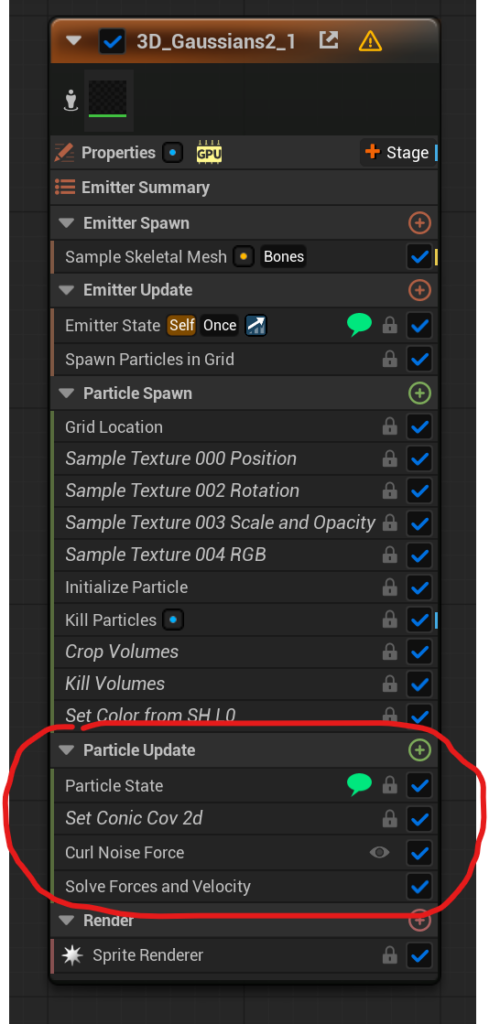
To achieve the desired effect, we can edit the Particle Update module; within this module, we can add various forces, allowing the Niagara System to use them to manipulate the movement of the particles. Here, we add a Curl Noise Force, which causes the particles to gradually blur and then fade away.
Bind to 3DGS Object
Once the Niagara system is ready, we can link it directly to the 3DGS Object so the Niagara System can control the behavior of particles.
Under Niagara Override, select the system you just made.

Last Updated: April 2026