On Monday, we playtested with The Beacon/Friendship Circle’s after school program with middle schoolers. Their feedback was also generally positive. Organizing what we learned from both playtests, we shared our findings and plans with our instructor and client
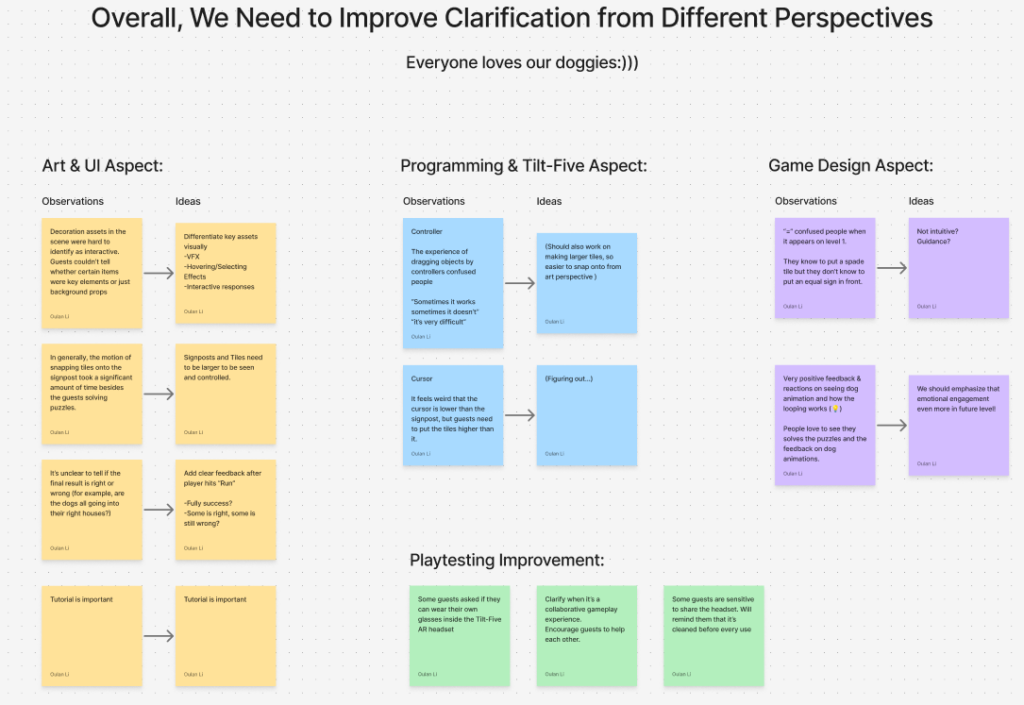
Playtests showed that players were engaged, especially kids, but the first few minutes were confusing due to missing onboarding. Once players understood the mechanics, they enjoyed the experience.
Onboarding and Tutorial
The main priority is making the first play clear.
An in-headset tutorial level will guide players using one tile per player, 3D arrows, and short text. A short group introduction with GIFs or videos will replace the current slideshow for pre-headset briefing. A house-based checkbox UI will show per-house success states during gameplay.
Visual Clarity
Interactive elements need to be easier to identify.
VFX such as hover and selection effects will distinguish interactive assets from decorative ones, and make signpost slots more visible. The cursor will be replaced with a hand model, and picked-up tiles will float or scale to indicate placement.
Controls and Feedback
Interaction needs to feel more responsive and forgiving.
Snap hitbox and distance for placement will be increased, and partial-success feedback will be clearer. Cursor smoothing will be reduced for more direct control, and highlighting will better match the target tile. Sound cues will be added for interactions and success states.
Notes
Hardware overheats after extended use, which may limit session length.
Plan
A tutorial level will be ready for the next milestone, with an additional level completed by the final presentation. Final deliverables will include a teacher’s guide and a summary of platform-specific learnings.